The script allows you to:
- Generate a QR code for a Wi-Fi wireless network;
- Generate a QR code and a VCF file (Business Card);
- Send the received files by email.
The script uses dialog.
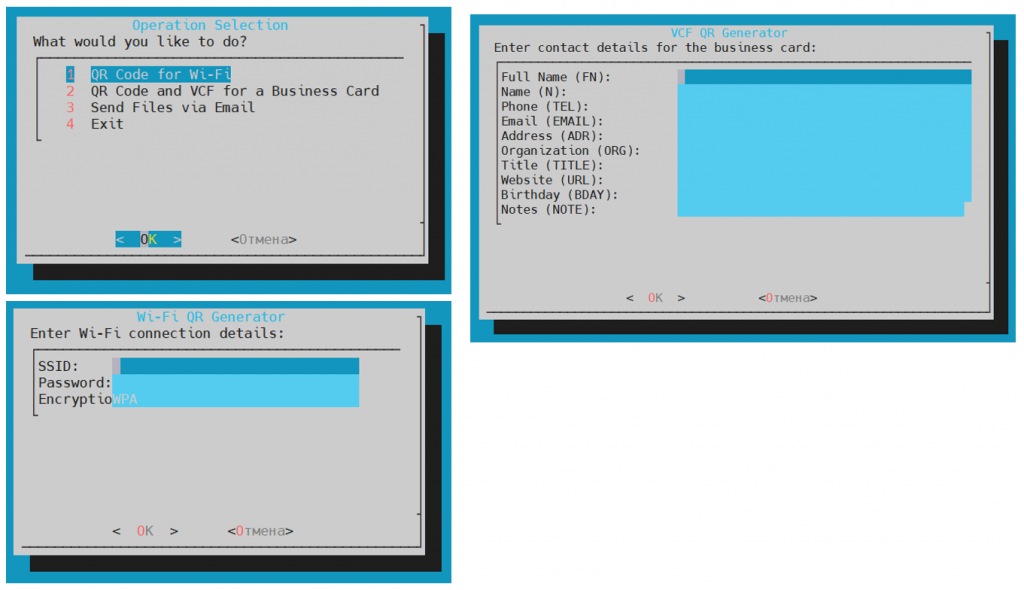
#!/bin/bash

# Enable debug mode
# set -x
# set +x

CHARSET="utf-8"
# Temporary files for dialog
WIFI_TMP=$(mktemp)
VCF_TMP=$(mktemp)
SEND_TMP=$(mktemp)
CHOICE_TMP=$(mktemp)
GENERATED_FILES=()

# Function to collect Wi-Fi details
get_wifi_details() {
    while true; do
        dialog --title "Wi-Fi QR Generator" \
               --form "Enter Wi-Fi connection details:" \
               15 50 0 \
               "SSID:" 1 1 "" 1 10 30 0 \
               "Password:" 2 1 "" 2 10 30 0 \
               "Encryption (WPA/WEP/NONE):" 3 1 "WPA" 3 10 30 0 \
               2>$WIFI_TMP

        if [ $? -ne 0 ]; then
            return 0  # Back
        fi

        SSID=$(sed -n '1p' $WIFI_TMP)
        PASSWORD=$(sed -n '2p' $WIFI_TMP)
        ENCRYPTION=$(sed -n '3p' $WIFI_TMP)

        if [ -z "$SSID" ] || [ -z "$PASSWORD" ] || [ -z "$ENCRYPTION" ]; then
            dialog --msgbox "SSID, password, and encryption type cannot be empty." 6 40
        else
            WIFI_STRING="WIFI:T:$ENCRYPTION;S:$SSID;P:$PASSWORD;;"
            qrencode -o wifi_qr.png "$WIFI_STRING"
            GENERATED_FILES+=(wifi_qr.png)
            dialog --msgbox "Wi-Fi QR code saved as wifi_qr.png" 6 40
            return 0
        fi
    done
}

# Function to collect VCF details
get_vcf_details() {
    while true; do
        dialog --title "VCF QR Generator" \
               --form "Enter contact details for the business card:" \
               20 70 0 \
               "Full Name (FN):" 1 1 "" 1 25 40 0 \
               "Name (N):" 2 1 "" 2 25 40 0 \
               "Phone (TEL):" 3 1 "" 3 25 40 0 \
               "Email (EMAIL):" 4 1 "" 4 25 40 0 \
               "Address (ADR):" 5 1 "" 5 25 40 0 \
               "Organization (ORG):" 6 1 "" 6 25 40 0 \
               "Title (TITLE):" 7 1 "" 7 25 40 0 \
               "Website (URL):" 8 1 "" 8 25 40 0 \
               "Birthday (BDAY):" 9 1 "" 9 25 40 0 \
               "Notes (NOTE):" 10 1 "" 10 25 40 0 \
               2>$VCF_TMP

        if [ $? -ne 0 ]; then
            return 0  # Back
        fi

        FN=$(sed -n '1p' $VCF_TMP)
        N=$(sed -n '2p' $VCF_TMP)
        TEL=$(sed -n '3p' $VCF_TMP)
        EMAIL=$(sed -n '4p' $VCF_TMP)
        ADR=$(sed -n '5p' $VCF_TMP)
        ORG=$(sed -n '6p' $VCF_TMP)
        TITLE=$(sed -n '7p' $VCF_TMP)
        URL=$(sed -n '8p' $VCF_TMP)
        BDAY=$(sed -n '9p' $VCF_TMP)
        NOTE=$(sed -n '10p' $VCF_TMP)

        if [ -z "$FN" ] || [ -z "$TEL" ] || [ -z "$EMAIL" ]; then
            dialog --msgbox "Full Name, Phone, and Email fields are mandatory." 6 50
        else
            VCF_CONTENT=$(cat <<-END
BEGIN:VCARD
VERSION:3.0
FN:$FN
N:$N;;;
TEL;TYPE=CELL:$TEL
EMAIL;TYPE=INTERNET:$EMAIL
ADR;TYPE=WORK:;;$ADR;;;;
ORG:$ORG
TITLE:$TITLE
URL:$URL
BDAY:$BDAY
NOTE:$NOTE
END:VCARD
END
)
            echo "$VCF_CONTENT" > contact.vcf
            qrencode -o vcf_qr.png "$VCF_CONTENT"
            GENERATED_FILES+=(contact.vcf vcf_qr.png)
            dialog --msgbox "VCF and QR code saved as contact.vcf and vcf_qr.png" 6 50
            return 0
        fi
    done
}

# Function to send email
send_email() {
    while true; do
        dialog --title "Send Email" \
               --inputbox "Enter email address to send files to:" 8 50 \
               2>$SEND_TMP

        if [ $? -ne 0 ]; then
            return 0  # Back
        fi

        EMAIL=$(cat $SEND_TMP)

        if [ -z "$EMAIL" ]; then
            dialog --msgbox "Email address cannot be empty." 6 40
        else
            sendemail -f <sender email> -t "$EMAIL" -u "Your QR Code" -m "Your files" -s <your an email server> -a ${GENERATED_FILES[@]} -o message-charset=$CHARSET
            if [ $? -eq 0 ]; then
                dialog --msgbox "Files successfully sent to $EMAIL" 6 40
                rm -f ${GENERATED_FILES[@]}
            else
                dialog --msgbox "Error sending files." 6 40
                rm -f ${GENERATED_FILES[@]}
            fi
            return 0
        fi
    done
}

# Main menu
main_menu() {
    while true; do
        dialog --title "Operation Selection" \
               --menu "What would you like to do?" 15 50 4 \
               1 "QR Code for Wi-Fi" \
               2 "QR Code and VCF for a Business Card" \
               3 "Send Files via Email" \
               4 "Exit" \
               2>$CHOICE_TMP

        CHOICE=$(cat $CHOICE_TMP)

        case $CHOICE in
            1) get_wifi_details ;;
            2) get_vcf_details ;;
            3)
                if [ ${#GENERATED_FILES[@]} -eq 0 ]; then
                    dialog --msgbox "No files to send." 6 40
                else
                    send_email
                fi
                ;;
            4) break ;;
            *) dialog --msgbox "Invalid choice." 6 40 ;;
        esac
    done
}

main_menu

# Remove temporary files
rm -f $WIFI_TMP $VCF_TMP $CHOICE_TMP $SEND_TMP

### hint ###
#sudo apt install sendemail libio-socket-ssl-perl libnet-ssleay-perl
#sendemail -f "Sender Name <sender@example.com>" \
#          -t recipient@example.com \
#          -u "Personalized Email" \
#          -m "This email has a custom sender name." \
#          -s smtp.example.com:587 \
#          -xu sender@example.com \
#          -xp "password"

#sendemail -f sender@example.com -t recipient@example.com \ -u "Log Test" -m "This email will be logged." \ -s smtp.yourserver.com:25 -l /path/to/logfile.log